
Create a case
Start blank or reuse a template, then organise into folders.
CASEVIO · AN IPAD-FIRST CLINICAL WORKSPACE
For surgeons, plastic surgeons, dermatologists and aesthetic medicine professionals. Compare before-and-after photos on iPad and keep each follow-up together with your case notes.
Now available on the App Store · Free to download
Designed around iPad, with the compatible iPad version also running on Apple silicon Macs. A MacBook Air M4 user has reported normal operation; download availability is subject to the App Store listing.
Start blank or reuse a template, then organise into folders.
Arrange photos by visit and angle; refine framing with guides.
Prepare images or documents, then back up to your chosen location.
THE WORKSPACE
From preoperative photography and postoperative follow-ups to case discussions: keep photos, dates and notes together instead of searching across albums and documents.
01 / CASEVIO
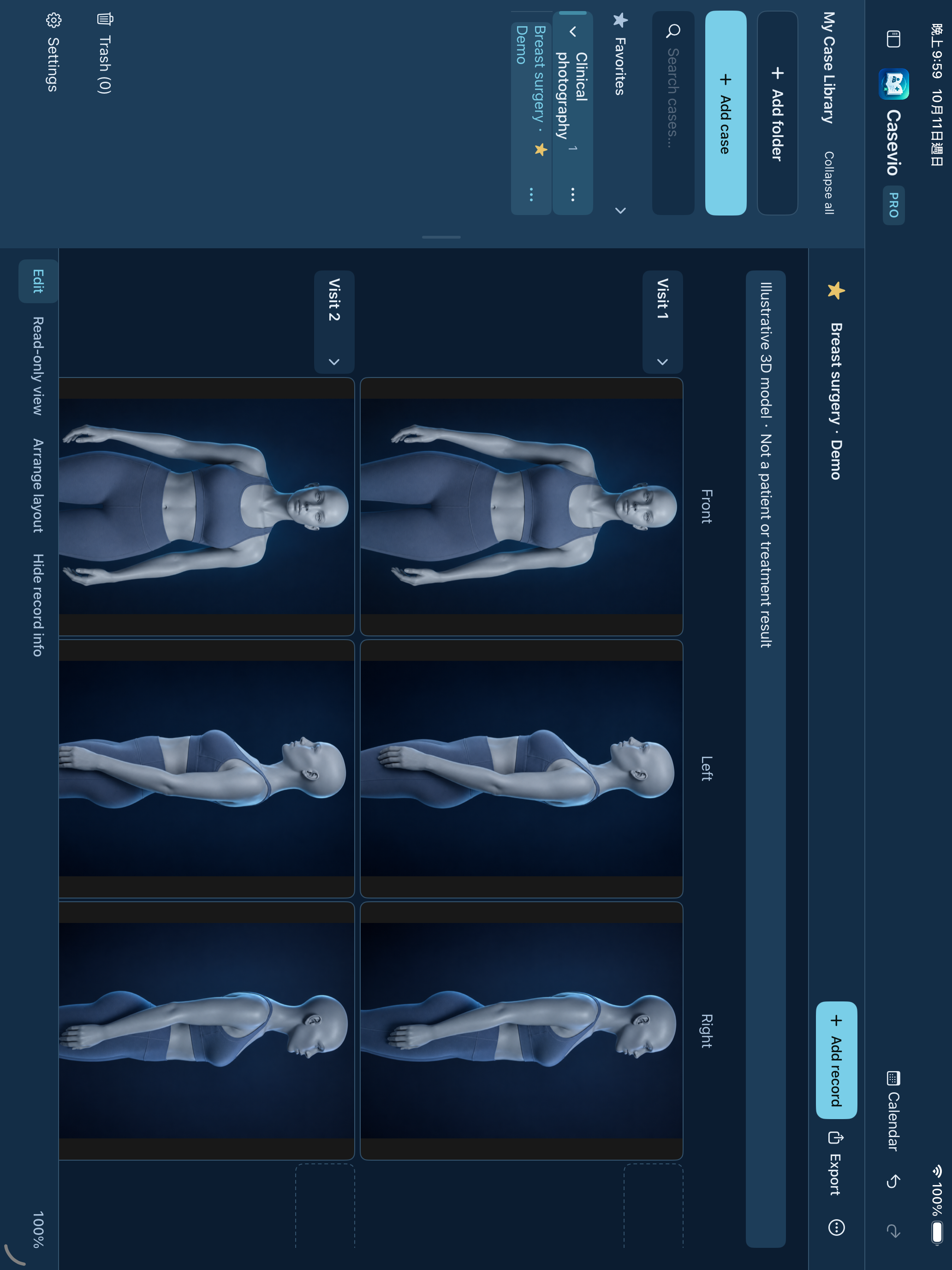
Add each visit by date, then keep front, side or custom views in matching columns. Compare photos across visits for surgical case documentation and long-term follow-up.
Use nested folders, colours, search and favourites, or find dated records in the calendar.
Name front, side or custom views. Scroll horizontally through additional columns and add more when needed.
Resize or hide the sidebar, zoom the workspace, or hide record names and dates.
02 / CASEVIO
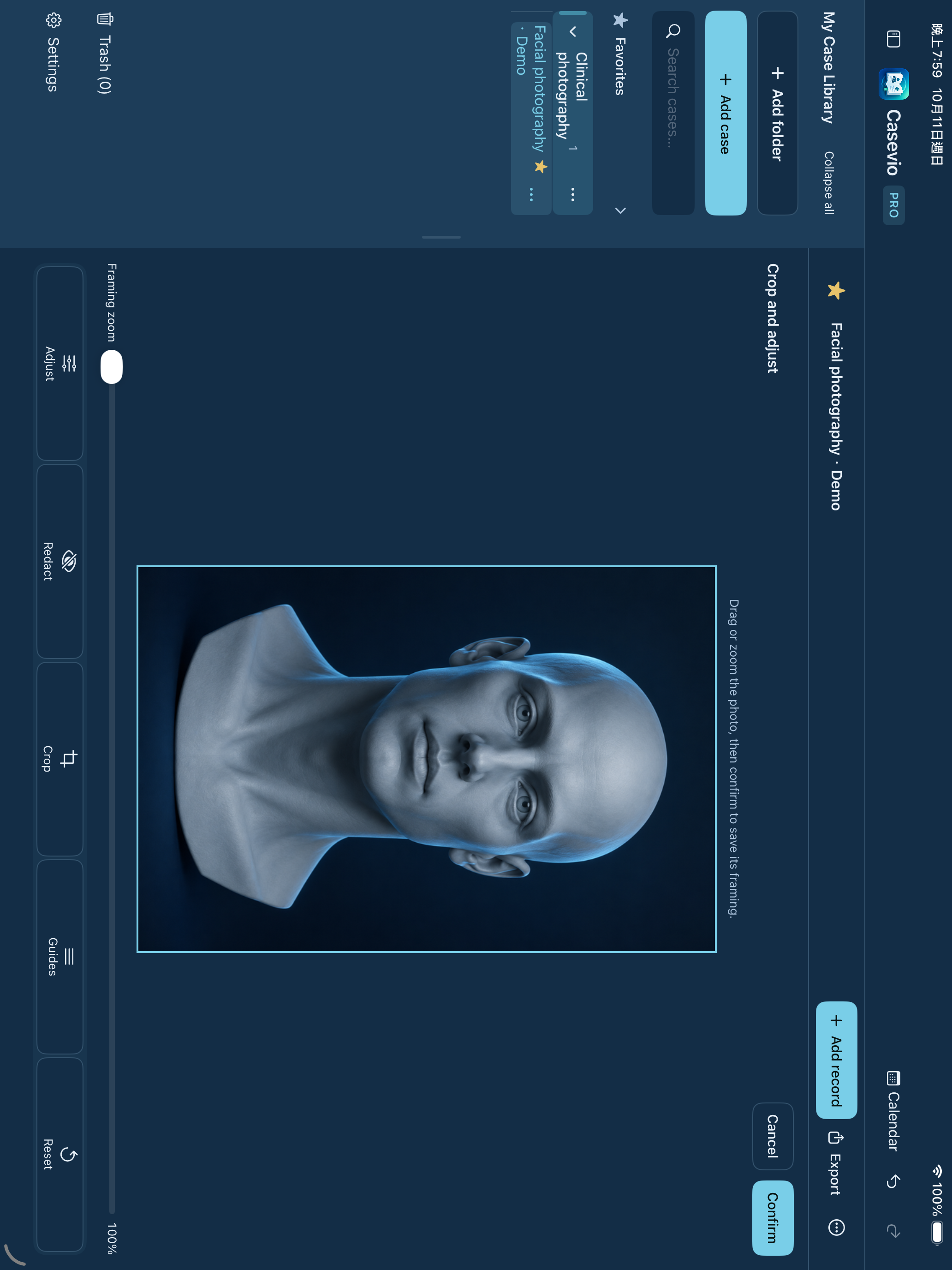
Tap a photo to open its editor. Adjust its framing, then confirm the view you want to keep in the case.
Crop, rotate and adjust perspective within the photo editor.
Use reference lines to help position photos consistently.
Apply redaction to selected areas and check the result before sharing.
03 / CASEVIO
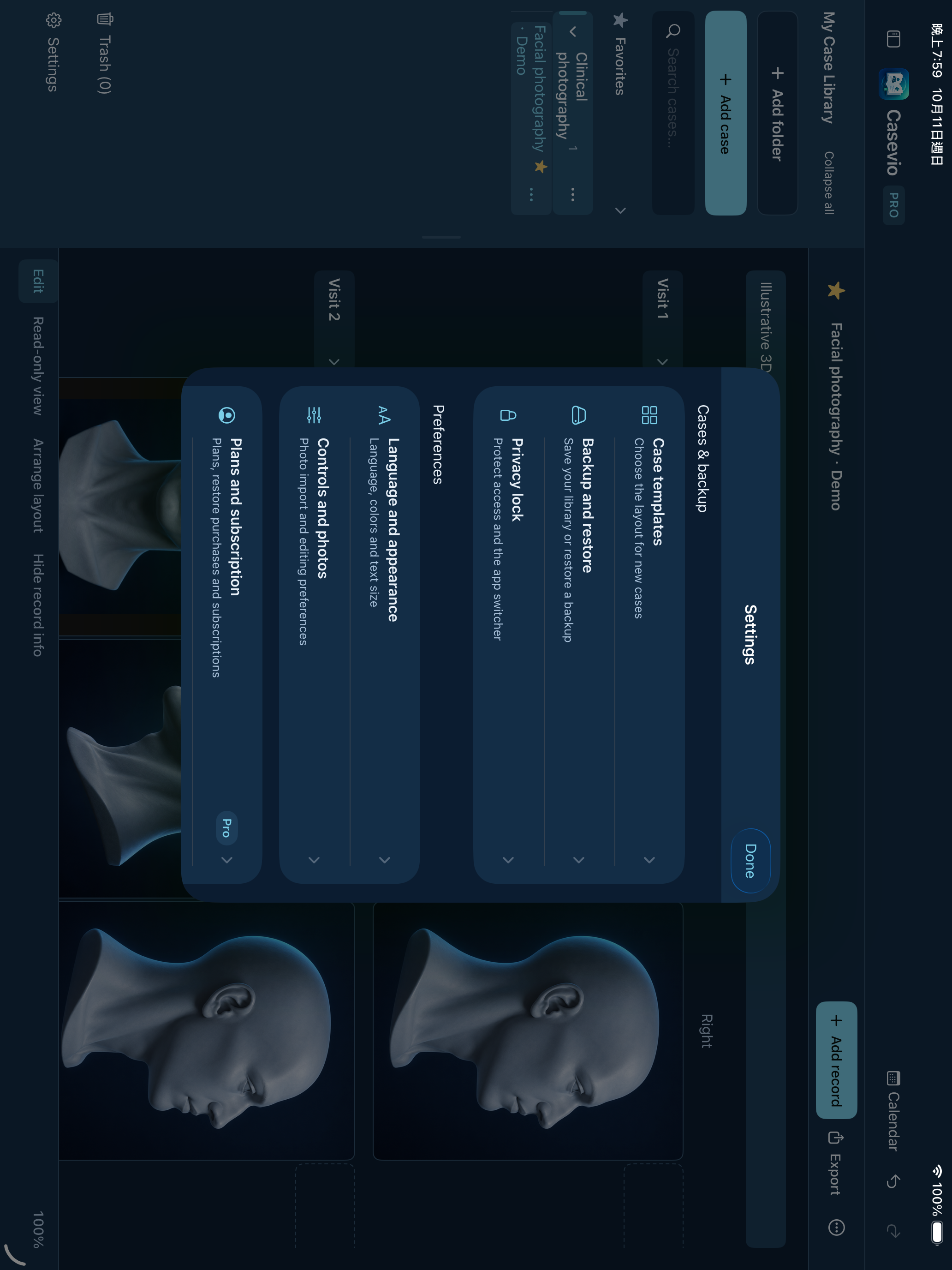
Save a familiar case layout as a template and manage backups from a single settings page.
Save the columns and record structure you use regularly.
Choose a backup destination through Files and optionally enable password encryption.
Select a backup and review the restore action in the app.
04 / CASEVIO
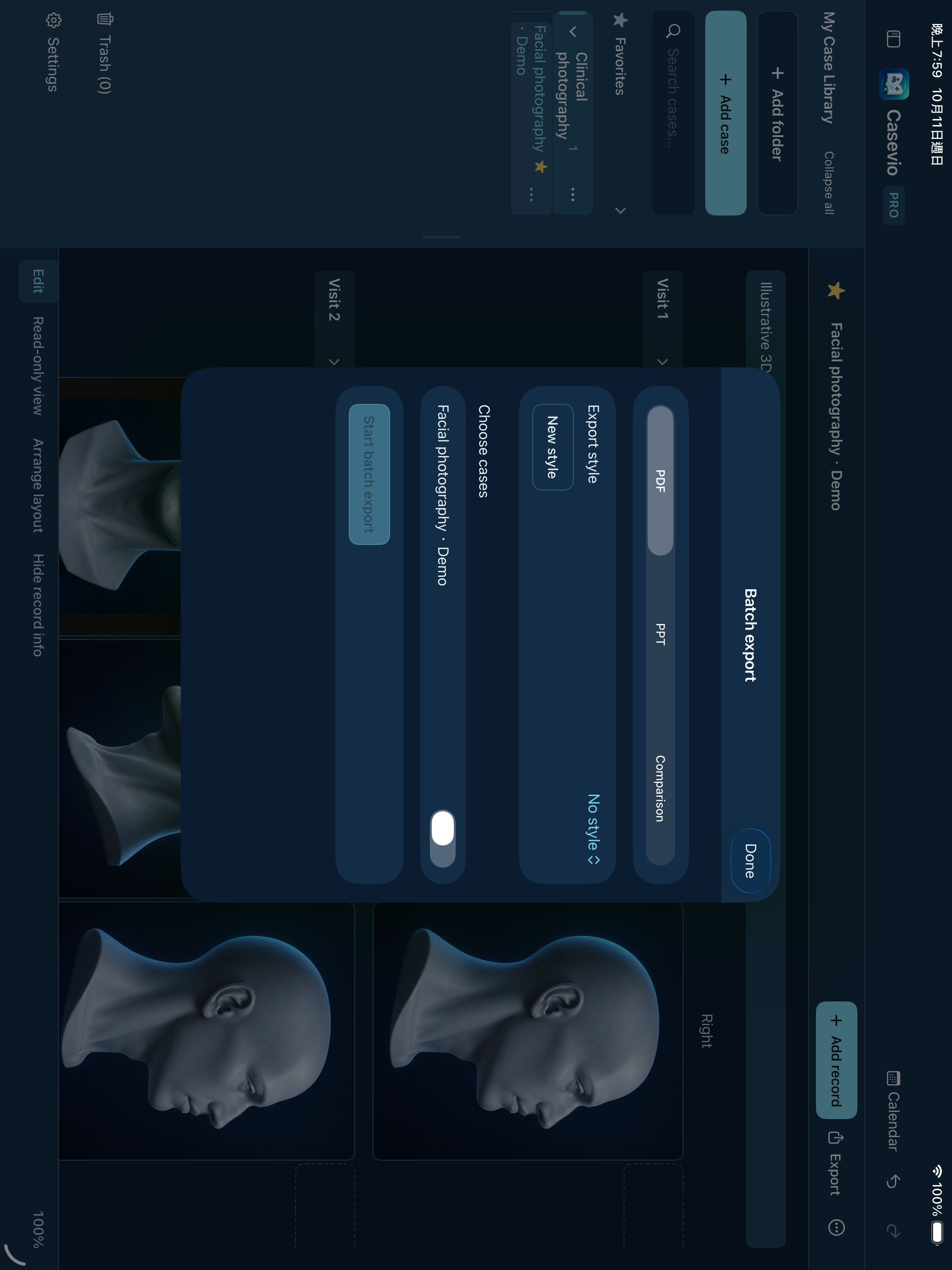
Prepare materials for case discussions, teaching and academic presentations. Pro exports multiple cases as PDF, editable PowerPoint or comparison images for use on a MacBook or desktop.
Export PDF or PPT for viewing and presenting on a MacBook or desktop computer; use paired images for comparison.
Save a clinic heading or logo and reuse your preferred export settings.
Generated files and individual case errors are shown before you share.
Real app captures using AI-generated 3D models and demo records, not patient photographs or treatment outcomes. Columns extend horizontally and you can add more as needed.
Group cases by specialty, procedure or your own categories. Use search, favourites and templates to find cases and continue documenting.
Compare matching angles across visits. Use cropping, rotation, perspective, guides and redaction to prepare the view.
Comparison images and PDF, with PPT, slideshows, batch export, output styles and scheduled backups in Pro.
BUILT FOR YOUR DAILY WORK
From the first record to the next visit and case presentation, practical tools help reduce repeated setup.
Visit records · Reference lines
Add a row for each visit and keep front, side and custom views in matching columns. Shared reference lines help position photos for clearer review.
10 templates in Free
Save your usual columns and record structure as templates. Free includes 10 saved templates; Pro removes the template limit for different procedures and workflows.
Read-only viewing · Pro slideshows
Read-only viewing helps avoid accidental changes. Pro slideshow mode supports case discussions and teaching; export editable PowerPoint when you need to refine slides.
Pro workflow tools
Pro offers batch case exports, matching-view photo adjustments and case photo compression. Back up important originals before choosing compression settings.
DATA SAFETY
Know where your data lives, how access is protected and what happens when you back up or share.
Cases and photos stay in local app storage. No Casevio account is required, and the app does not automatically upload your library to a developer-operated case server.
Enable the app lock to authenticate with supported Face ID, Touch ID or your device passcode.
Optionally protect backup files with a password. Keep it safe: restoring requires the password, and the developer cannot recover it.
Use redaction and check exported photos, names and notes. Redaction retains the source photo; exported documents are not encrypted backups.
Back up through Files using iCloud Drive or Google Drive. This is not live sync. Scheduled backups check when the app opens or returns to the foreground; they are not guaranteed while the app stays closed.
Read the privacy policy ↗FREE & PRO
Free gives you a useful everyday workspace. Pro adds capacity and tools for repeated editing, presentations and larger exports.
Download for free. Choose Pro monthly, annual or lifetime access in the app when you need more cases and advanced tools.
FREE For getting started
Build your case library and experience the complete basic workflow.
PRO For a growing case library
Billed monthly. Cancel in Apple subscription settings.
Everything in Free, plus more capacity and advanced output tools.
Price region: United States (US$).
US App Store prices, in US dollars. Monthly, annual and lifetime plans include the same Pro features. Confirm regional pricing in the App Store purchase sheet.
| Feature | Free | Pro |
|---|---|---|
| Cases / templates | 10 / 10 | Unlimited |
| Photo editing & redaction | Included | Included |
| Comparison images & basic PDF | Included | Included |
| Manual backup & restore | Included | Included |
| App lock & backup encryption | Included | Included |
| PowerPoint & slideshow | — | Included |
| Batch export & clinic styles | — | Included |
| Apply matching-angle adjustments | — | Included |
| Scheduled backup & compression | — | Included |
Your existing cases remain accessible and editable after a subscription ends. Storage is limited by your device and chosen backup destination.
Apple handles monthly and annual subscription payments and automatic renewal unless cancelled. Lifetime does not renew. Manage subscriptions in your Apple Account; deleting the app does not cancel a subscription.
Lifetime includes current Pro features and their maintenance updates. Future separately sold cloud storage, AI or team services are not included. Buying lifetime access does not automatically cancel an existing subscription; manage renewal in Apple subscription settings.
A user has tested Casevio on a MacBook Air M4 and reported normal operation. Apple silicon Macs run the compatible iPad version, not a separate macOS app. Intel Macs are not supported. Download availability and system requirements are subject to the App Store listing.
Yes. The screenshots come from the actual app, using AI-generated 3D models and demo records rather than patient photos or treatment results.
You can select a location in Files for your backup. Enable your preferred cloud provider in Files first and confirm the upload there. This is file backup, not automatic synchronization.
Pro checks the selected interval when the app opens or returns to the foreground. The app does not promise backups while it remains closed.
Yes. Casevio is available as a free download on the App Store. Pro monthly, annual and lifetime options are available in the app. Check your local App Store for device compatibility and availability.
Existing cases remain accessible and editable. Free limits apply to new cases and templates; Pro-only tools require an active subscription.
CASEVIO
Start with Free on iPad, iPhone or a compatible Apple silicon Mac.
Download on the App Store ↗